
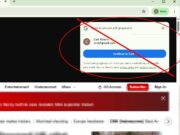
If you’ve been browsing the web lately, you’ve seen it: a Google sign-in pop-up appearing in the corner of a website, asking you to “Continue as…” your Google account.
While some people find it convenient, many users consider it an unwanted distraction. The pop-up can cover content, interrupt reading, and repeatedly appear on sites where you have no intention of creating an account or signing in.
What Is It?
The pop-up is part of Google’s “Sign in with Google” system. It allows websites to offer one-click account creation and login using your Google account instead of requiring a separate username and password.
For websites, it’s a way to reduce friction and encourage registrations. For users, it can be a convenient alternative to remembering yet another password.
The problem is that many websites display the prompt automatically, whether you’re interested in signing in or not.
Why People Find The Google Sign In Annoying
Common complaints include:
- It appears on websites you only want to read.
- It covers page content.
- It repeatedly returns even after being dismissed.
- It encourages sharing account information with sites you may not trust.
- It creates unnecessary clutter while browsing.
Fortunately, Google has a way to disable it.
How to Turn Google Sign In Nags Off
Forget about the dozen-some steps you’ve seen on other sites to accomplish this.
It’s really much easier than that.
Go to:
https://myaccount.google.com/connections/settings
and disable the thing.
Will This Break Anything?
No. Websites that support Google sign-in will still work. You can still choose to sign in with Google whenever you want. The only thing that changes is that the automatic pop-up prompt will stop appearing.
The Bottom Line
Google’s sign-in prompt is designed to make logging into websites faster, but for many users it creates more annoyance than convenience. If you’re tired of seeing the pop-up on news sites, blogs, and forums, disabling the feature takes less than 30 seconds and can make browsing noticeably less distracting.


